Carousel Hooks: How to Write a First Slide People Swipe
By Piet PhamReviewed on 8 min read

Most carousels are lost on slide one. The content behind it can be excellent, but if the first slide reads like a label instead of a reason to keep going, the reader scrolls past and never sees it. This guide covers what a hook has to do, seven patterns that work, and how to test them without fooling yourself.
Key Takeaways
- A hook names one specific problem, result, or question in the reader's words.
- Write or revise the hook after the content slides, so it promises only what they deliver.
- Keep it short enough to read at a glance, and move detail to slide two or the caption.
- Pick one clear image for slide one and keep the text away from faces and app controls.
- Test hooks by changing only the first slide, and judge them by saves, shares, and visits.
What a Carousel Hook Has to Do
In a feed, the first slide competes with every other post on the screen. It has a headline, an image, and about as long as a thumb pause to make its case. That is enough time to understand one idea, not three.
A good hook does two things at once. It tells the right reader "this is about you," and it creates a small gap that the next slide closes. "5 high-protein breakfasts you can prep on Sunday" works because the reader knows exactly what they will get and wants to see the list. "Breakfast ideas" names a topic but gives nobody a reason to swipe.
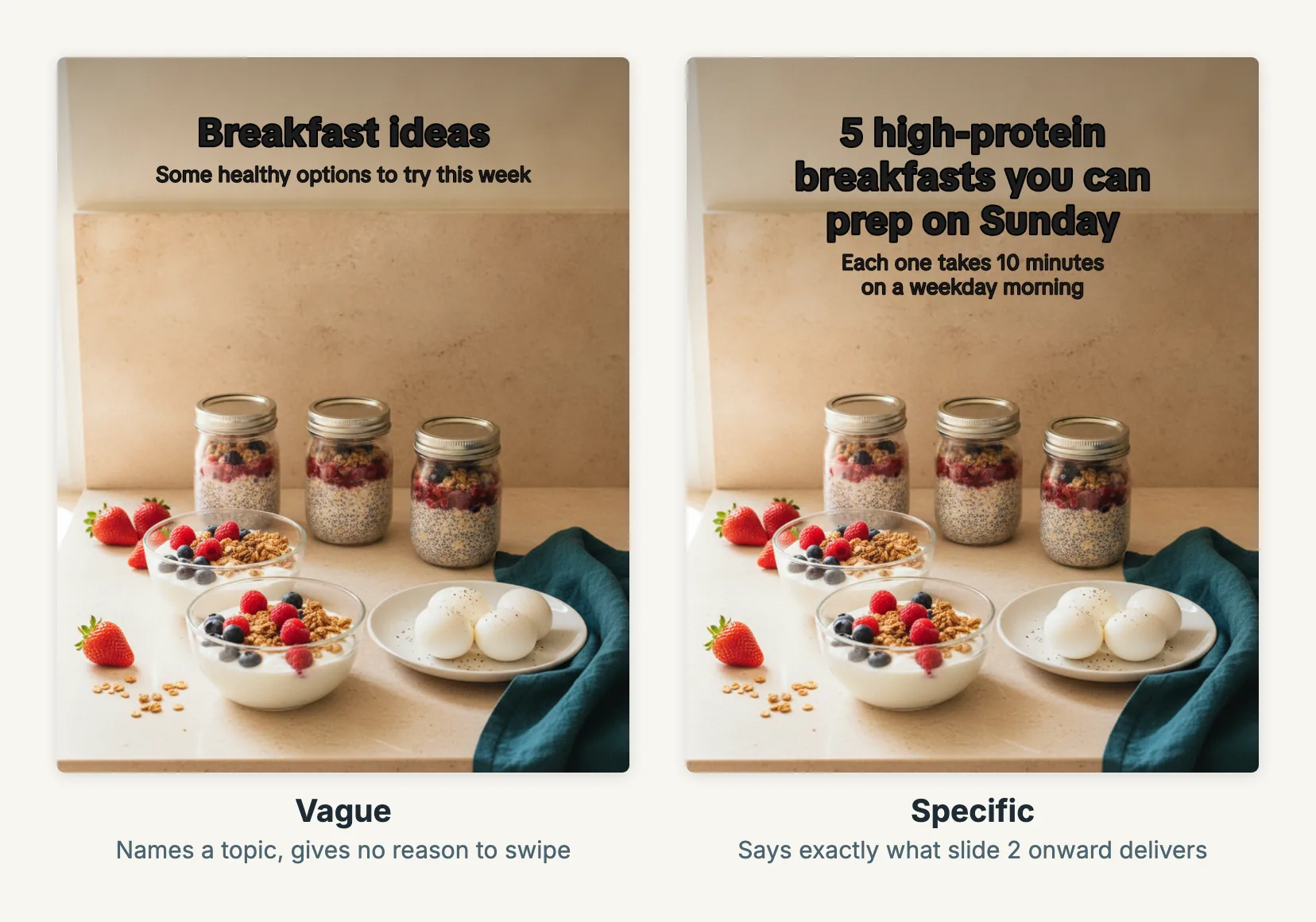
Two first slides exported from Wavegrain on the same image. Only the words change, and only the specific one tells the reader what the rest of the carousel delivers. The background is a Wavegrain-generated image.
The hook is also a promise. If slide one says "the one setting that fixed my sleep" and the carousel turns out to be a generic list of sleep tips, the reader feels misled and is less likely to stop on your next post. A hook that slightly undersells a strong carousel is better than one that oversells a weak one.
Seven Hook Patterns That Work for Carousels
These are patterns, not templates. Each one only works when the slides behind it deliver the payoff it names.
| Pattern | Use it when | Example first slide | What the next slides must deliver |
|---|---|---|---|
| Specific problem | Your audience already feels a pain | "Your new habit disappears after a week?" | The cause and a fix they can try today |
| Number and outcome | The content is a list or a set of steps | "5 meal prep boxes that last until Friday" | Exactly five, each one usable |
| Common mistake | People do something the hard way | "You are probably storing coffee beans wrong" | The mistake, why it matters, the better way |
| Before and after | The result is visible | "Same room, $40 of changes" | The changes, with costs and photos |
| Question in their words | You have heard the exact question | "Can you really learn Spanish in 15 minutes a day?" | An honest answer, including limits |
| Reference or checklist | The content is worth saving | "Carry-on packing list for a 5-day trip" | A complete list someone would actually use |
| Contrarian with proof | You can back the claim | "Stop posting every day. Here is what we did instead." | The evidence and what changed |
The best source for hook wording is your audience, not a swipe file. Look at comments, support messages, reviews, and the questions people ask in your niche, then use their phrasing. "How do I stop my sourdough going flat?" beats "Sourdough troubleshooting tips" because it is the sentence the reader already has in their head.
Write the Hook Last
It feels natural to start with the hook. In practice, the hook should be written after the content slides, or rewritten once they exist.
Draft the middle slides first: the steps, the list, the examples. Then ask what a reader gets if they swipe to the end, and put that payoff on slide one in the fewest words that still make it specific. This keeps the promise and the delivery aligned, which matters more than any clever phrasing.
A simple check: read slide one, then jump to the last content slide. If the last slide fully pays off the first, the hook is honest. If it only half answers it, either cut the hook back or strengthen the carousel.
For a full sequence from topic to export, see the AI carousel workflow guide. If the carousel promotes an app, the slideshow and Reels playbook shows how to keep the hook, the post, and the destination page making the same promise.
Make Slide One Readable at a Glance
A hook that takes effort to read fails before its wording matters. Some practical limits help:
- One idea per slide one. If you need "and," the second idea probably belongs on slide two.
- Roughly eight words or fewer for the headline. Supporting detail goes in a smaller line below, on slide two, or in the post caption.
- Strong contrast. Light text on a busy, bright photo is the most common readability failure. Use a darker area of the image, a soft scrim, or a solid text plate.
- Large type. Check the slide at actual phone size, not on a desktop monitor where everything looks readable.
- Nothing important under app controls. TikTok and Reels overlay buttons and captions on the image. Our TikTok slideshow guide and carousel size guide cover where those areas sit.
Pair the Hook With the Right Image
The image on slide one should make the headline easier to believe, not compete with it. A hook about meal prep wants a photo of containers with food, not an abstract kitchen. A hook about a mistake can show the mistake.
Leave room for the text. A photo with a clear area of sky, wall, table, or soft background lets the headline sit there without covering the subject. Avoid placing text across a face; it hides the most attention-grabbing part of the image and is hard to read. If the same AI-generated person appears on the hook and the later slides, check that the face stays the same; why AI image characters drift covers the causes and the fixes.
In Wavegrain you can choose a separate image collection for the Hook slide, so the opening uses your strongest, clearest photos while the content slides draw from a different set. Captions are placed to avoid the busiest parts of each photo, and you can move or restyle them in the editor before export.
Make Slide Two Keep the Promise
The swipe is a small commitment, and slide two decides whether it was worth it. Start delivering immediately: the first item of the list, the cause of the problem, the first step. Do not spend slide two on an introduction, a story about yourself, or a restatement of the hook.
If your hook is a question, slide two should start answering it. If it is a number, slide two is item one. When the payoff starts right away, the reader has a reason to keep swiping, and a carousel read to the end is the one that gets saved or shared.
There is a second reason to make slide two strong on Instagram. Instagram head Adam Mosseri said in a 2024 video that a carousel someone scrolls past without swiping can be shown to them again, starting from the second slide. That is a statement from Instagram, not a documented rule, but it means slide two can work as a second first impression. A slide two that makes sense on its own, with a clear headline of its own, covers both cases.
Test Hooks Without Fooling Yourself
Hook testing is useful, but easy to get wrong. If you change the topic, the images, the posting time, and the hook at once, you learn nothing about the hook.
A fair test looks like this:
- Keep the content slides, images, and caption the same.
- Write two first slides that use different patterns, for example a specific problem against a number and outcome.
- Publish them on comparable days and times, a week or more apart.
- Compare saves, shares, and profile or link visits, not only views or likes.
- Record both hooks and the results in a simple sheet.
One pair of posts is a lead, not a rule. Repeat a pattern across several topics before deciding it suits your audience. And keep the honest-promise check from earlier: a hook that wins on views but loses on saves is often overselling.
Common Hook Mistakes
- Starting with your brand. "Brand X Tips Vol. 3" tells the reader nothing about what they get.
- Being vague. "Things you should know about skincare" could introduce any post.
- Writing a paragraph. If slide one needs three lines of small type, the idea is not focused yet.
- Overpromising. "This changes everything" sets up a disappointment unless it really does.
- Copying another creator's hook word for word. Borrow the pattern, write the words for your own audience and content.
Wavegrain can suggest several editable hooks for a topic based on your brand's voice and audience, along with directions for the middle slides. Treat them as drafts: pick one that matches your content, rewrite it in your audience's words, and regenerate or edit any single slide without rebuilding the carousel.
Frequently asked questions
- What is a hook in a carousel post?
- The hook is the first slide: usually a short headline over one image. Its job is to make the reader want slide two by naming a specific problem, result, or question that the rest of the carousel answers.
- How long should a carousel hook be?
- Short enough to read at a glance on a phone. A useful working limit is one idea in roughly eight words or fewer, with any supporting detail moved to slide two or the caption.
- Should the hook be written first or last?
- Last, or at least revised last. Draft the content slides first, then write a hook that promises exactly what they deliver. A hook written first tends to promise more than the carousel contains.
- How do I know which hook works better?
- Publish two versions of the same carousel that differ only in the first slide, on comparable days, and compare saves, shares, and profile or link visits rather than views alone. One pair of posts is a lead, not proof.