How to Make a TikTok Slideshow People Actually Swipe Through
By Piet PhamReviewed on 7 min read
A TikTok slideshow is a set of photos posted as one swipeable post, usually with a sound and a line of text on each image. Posting one takes a minute. Making one people swipe to the end takes a little planning: the right image size, text that stays clear of TikTok's buttons, and slides that tell a short story.
Key Takeaways
- Post photos as a photo post (a swipeable carousel), not as a video, unless you want a non-swipeable video.
- Export photos at 1080x1920 so they fill a portrait phone screen.
- Keep text away from the right-side buttons and the bottom caption area.
- Plan the slides like a carousel: a hook, a few slides that deliver, and a clear last slide.
- TikTok allows up to 35 photos, but most useful slideshows are under ten.
How to Post a TikTok Slideshow, Step by Step
TikTok calls swipeable slideshows photo posts, and it introduced them as Photo Mode in 2022: still images that display one after another with music, which viewers can also swipe through at their own pace. Labels in the app change from version to version, but the flow has stayed close to this:
- Open TikTok and tap the + button.
- Tap Upload to open your gallery.
- Switch to photos if needed and select your images in the order you want them to appear.
- If TikTok offers a choice between a photo post and a video, choose the photo option to keep a swipeable carousel.
- Tap Next and add a sound. A slideshow has one sound for the whole post.
- Add on-screen text or stickers if your images do not already carry text.
- Write the caption, add relevant hashtags, choose a cover if offered, and post.
The order you select photos in is the order they appear, so name or sort your exported files before uploading. If you export from a tool that numbers the files, select them in that numeric order.
Photo Post or Video: Which to Choose
The two options look similar while editing and behave differently once posted.
| Photo post | Video slideshow or template | |
|---|---|---|
| How viewers move through it | Swipe, or let it advance with the music | Plays through as one video |
| Can a viewer stop on one slide | Yes | Only by pausing |
| Best for | Lists, steps, tips, before and after | Mood edits, montages timed to a beat |
| Text-heavy slides | Work well, the reader controls the pace | Risky, slides may pass before they are read |
For anything a reader needs to read, such as tips, steps, or a list, use a photo post. The reader sets the pace, and a slide they want to read twice stays on screen.
How to Make a TikTok Slideshow on PC
TikTok's own instructions put photo posts in the phone app. Its help page on making a post gives photo steps for the app only: tap Add post, tap Photo, then Upload, with up to 35 photos. The same page's web browser steps cover video: click Upload, then Select video to upload or Select file. TikTok's Creator Academy guide to photo posts, last updated July 3, 2026, also starts in the app.
So on a computer you have three routes:
- Make the slides on the computer, post from the phone. Export the images, move them to your phone, and post them as a photo post in the app. This keeps the swipeable format.
- Upload a slideshow video from the browser. Join the slides into one vertical video and upload it on tiktok.com. It posts as a video, so viewers cannot swipe or stop on a slide, as the table above shows.
- Use a scheduling tool that posts photos. TikTok's photo posting API lets approved tools post up to 35 images, so some desktop schedulers can publish a photo post for you. Check that your tool supports TikTok photo posts, not only videos.
Some creators report that the browser uploader also accepts photos. TikTok's help pages did not describe that when we checked on 2026-10-18, so look at the Upload page in your own browser before planning around it.
What Size Should TikTok Slideshow Photos Be?
Export at 1080x1920 pixels (9:16). That fills a portrait phone screen edge to edge, which is how most people watch TikTok.
TikTok does not publish an official aspect ratio for photo posts. Its photo posting API reference accepts up to 35 images, and its media transfer guide lists JPEG or WebP images up to 1080p and 20 MB each. Images in other shapes, such as a 4:5 Instagram slide, may not fill the screen.
If you reuse an Instagram carousel on TikTok, export a separate 9:16 version instead of uploading the 4:5 files. The Instagram carousel size guide covers the Instagram side.
Keep Text Clear of TikTok's Buttons
A TikTok post is covered by the app's own interface. The like, comment, share, and profile buttons stack along the right side. Your username, caption, and the sound name sit along the bottom. The top of the screen holds the Following and For You tabs.
Text placed in those areas is partly hidden, or competes with the buttons for attention. Wavegrain uses a conservative caption area for 1080x1920 TikTok slides, based on the app's layout:
| Area of a 1080x1920 slide | What sits there | Rule of thumb |
|---|---|---|
| Top ~250 px | Tabs and status bar | Keep headlines below it |
| Right ~260 px | Like, comment, share, profile | Keep text to the left of it |
| Bottom ~460 px | Username, caption, sound | Keep text above it |
| Left ~65 px | Screen edge | Leave a margin |
That leaves a safe text area of roughly 750 by 1200 pixels, set slightly left of centre.
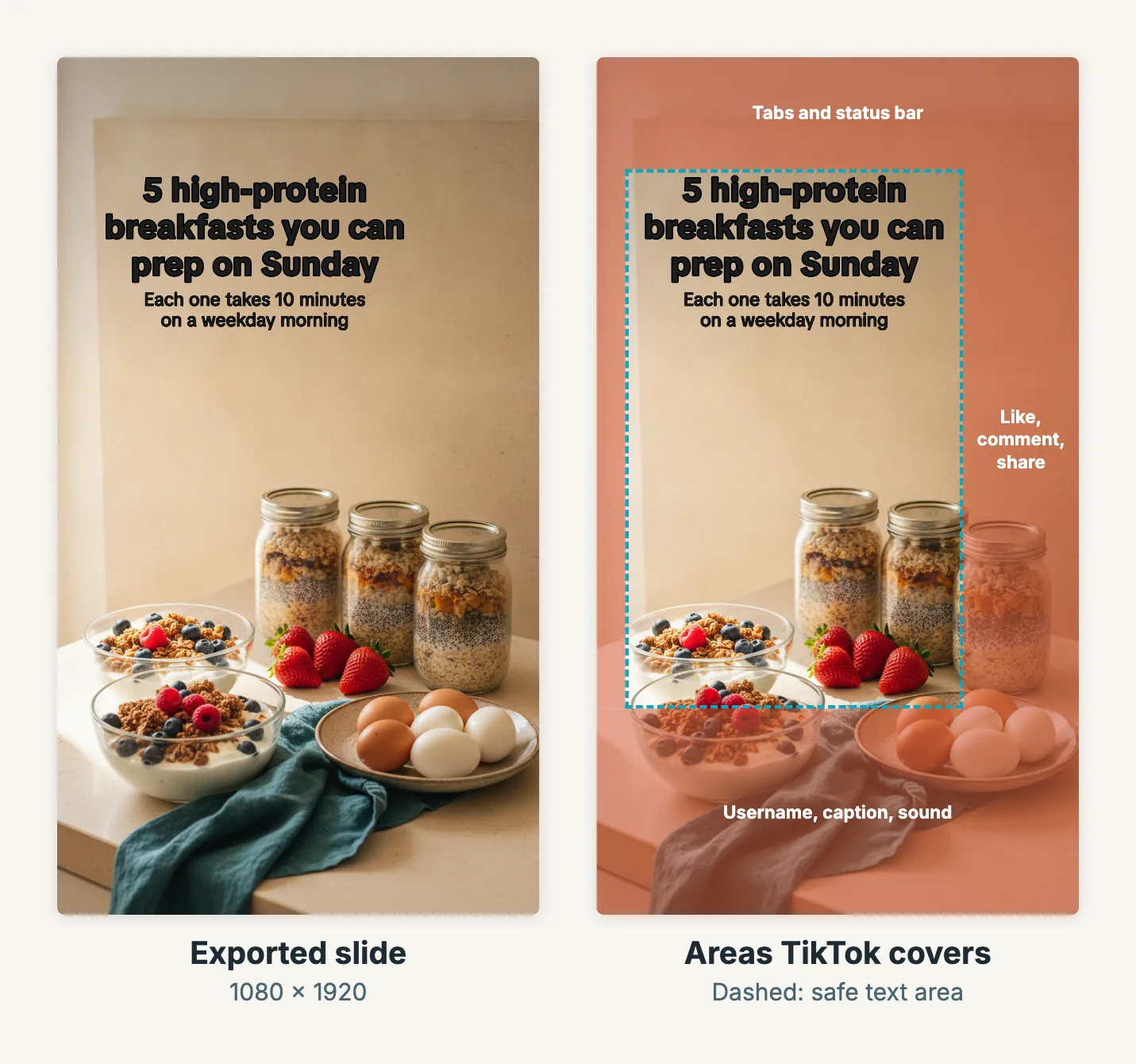
Left: a 1080x1920 slide exported from Wavegrain, with the caption placed automatically. Right: the same slide with the areas TikTok's interface covers shaded, using the numbers in the table. The background is a Wavegrain-generated image. These are working numbers, not an official TikTok specification, and the exact interface varies by device and app version. Check the post preview before publishing.
Plan the Slides Like a Carousel
A slideshow with a sound is still a carousel. The same structure that works on Instagram works here:
- Slide 1, the hook. Name the problem or the payoff in a few words. See our guide to carousel hooks for patterns and examples.
- Slides 2 to 6, the delivery. One tip, step, or example per slide. Start delivering on slide two.
- Last slide, the ending. A summary, a "save this," or one clear next step.
TikTok allows up to 35 photos, but a slideshow that runs long asks a lot of a viewer who arrived from a scroll. Five to eight slides is a sensible starting length for a tip or list post. Cut any slide that repeats an earlier one.
Keep text short enough to read before the slide advances on its own. One headline and one supporting line per slide is plenty. Put longer explanations in the caption, where people who want the detail can read it.
Pick a Sound That Fits the Pace
The sound sets the mood and, if the slideshow advances on its own, the rhythm. A calm, steady track suits a tutorial; an upbeat one suits a before and after. Choose music from TikTok's library inside the app, so it is available to use in your post.
Do not rely on the sound to explain anything. Many people scroll with the sound off, so every slide should make sense as text and image alone.
Making the Slides Without Starting From Scratch
The slow part of a slideshow is rarely the upload. It is choosing the images, writing short text for each slide, and placing that text where it can be read.
Wavegrain drafts the slide copy from a topic, pairs each slide with images from your own collection or generated ones, and places the captions inside the TikTok safe area described above. You can edit any slide, then export the set as 1080x1920 PNG files and upload them in the TikTok app, or export a vertical MP4 if you are posting a video from a computer. Wavegrain does not post to TikTok for you.
If you are using slideshows to promote an app, the slideshow and Reels playbook shows how to connect the post to an app page and measure what happens next.
Frequently asked questions
- How many photos can a TikTok slideshow have?
- Up to 35. TikTok's photo posting API allows up to 35 images per post, and TikTok's editing help describes up to 35 items per editing session. Most useful slideshows are far shorter.
- What size should TikTok slideshow photos be?
- 1080x1920 pixels (9:16) fills a portrait phone screen. TikTok does not publish an official photo aspect ratio; its posting API accepts JPEG or WebP images up to 1080p and 20 MB each.
- What is the difference between a TikTok photo post and a video slideshow?
- A photo post keeps the images as a swipeable carousel that can also advance on its own with music. A video slideshow or template turns the photos into a single video that plays through without swiping.
- Can I post a TikTok slideshow from a computer?
- TikTok's help pages describe photo posts in the phone app and video uploads in a web browser. To keep a swipeable photo post, make the slides on your computer and post them from the app, or use a scheduling tool that posts photos through TikTok's posting API. A browser upload of a slideshow video posts a video instead.
- How long can a TikTok slideshow caption be?
- TikTok's posting API allows a photo post description of up to 4,000 characters. TikTok's own announcement in 2022 gave 2,200, and the in-app limit has changed over time, so check the counter in the app.