Instagram Carousel Size in 2026: 4:5, 3:4, and Square Explained
By Piet PhamReviewed on 7 min read
Instagram carousel sizes changed twice in two years. The limit went from 10 slides to 20, and the app began accepting taller 3:4 portrait images while the profile grid switched from squares to 3:4 thumbnails. Older size guides still repeat the 2023 answer, so here is what to export now and where the app and scheduling tools still disagree.
Key Takeaways
- Every Instagram feed image is shown 1080 pixels wide, so export at 1080 wide.
- 1080x1350 (4:5) is the safest default because the app and scheduling tools both accept it.
- 1080x1440 (3:4) gives the tallest slide in the app, but API-based schedulers may crop it to 4:5.
- The first slide's shape applies to the whole carousel, so export every slide at one size.
- The profile grid shows a 3:4 thumbnail, so keep key text away from the left and right edges of a 4:5 or square slide.
Instagram Carousel Sizes at a Glance
Instagram's help center page on photo resolution says photos keep their resolution when their ratio is between 1.91:1 and 3:4, which works out to 1080 pixels wide and 566 to 1440 pixels tall. Wider images are scaled down to 1080, and much smaller ones are enlarged.
| Shape | Export size | Best for | Watch out for |
|---|---|---|---|
| 4:5 portrait | 1080 x 1350 | The default for most carousels | About 34 px is cut from each side in the profile grid |
| 3:4 portrait | 1080 x 1440 | The most screen space, posted in the app | Schedulers using the API may crop it to 4:5 |
| 1:1 square | 1080 x 1080 | Reused square content, quote cards | Smaller in the feed, and 135 px is cut from each side in the grid |
| 1.91:1 landscape | 1080 x 566 | Wide photos, rare for carousels | Very little screen space on a phone |
For most carousels, the choice is between 4:5 and 3:4. Both are 1080 wide, and 3:4 is 90 pixels taller. That extra height is room for a larger headline or more of the photo, which is why it is worth using when your publishing route supports it.
4:5 or 3:4: Which Should You Use?
Choose by how you publish.
If you post directly in the Instagram app, 3:4 at 1080x1440 gives you the tallest slide the feed shows. Support for 3:4 photos arrived in 2025 alongside the taller profile grid.
If you schedule through a tool, check before exporting at 3:4. Instagram's content publishing API documentation still describes a 4:5 to 1.91:1 range for images and a limit of 10 items per carousel. A scheduler built on that API may crop a 3:4 slide to 4:5 or reject slides beyond the tenth. If the tool does not say it supports 3:4 and 20 items, use 4:5.
If you are not sure, use 4:5 at 1080x1350. It works everywhere, and it is only 90 pixels shorter.
Every Slide Should Be the Same Size
Instagram's developer documentation says carousel images are cropped based on the first image in the carousel. Creators commonly report the same behaviour in the app: the first slide's shape sets the frame, and later slides with a different shape are cropped to match. The app has offered resize options for mixed shapes at times, but those vary by version and account.
The simplest rule is to export the whole carousel at one size. A headline placed near the bottom of a 3:4 slide can be cut off if the carousel opens with a 4:5 slide, and nothing in the upload screen makes that obvious.
How the Profile Grid Crops Carousels
Instagram's profile grid now shows tall 3:4 thumbnails instead of squares. The thumbnail is the full height of the first slide and a narrower slice of its width. The numbers below are our own calculation from that ratio:
- A 3:4 slide fills the thumbnail exactly. Nothing is cut.
- A 4:5 slide loses about 34 pixels from the left and right edges (the visible area is about 1012 x 1350).
- A square slide loses about 135 pixels from each side (the visible area is 810 x 1080).
Some size guides say the grid crops the top and bottom of a 4:5 image. For a 3:4 thumbnail, the arithmetic says the sides are cut, not the top and bottom. You can usually adjust the grid crop when you post, but it is easier to design so you do not have to.
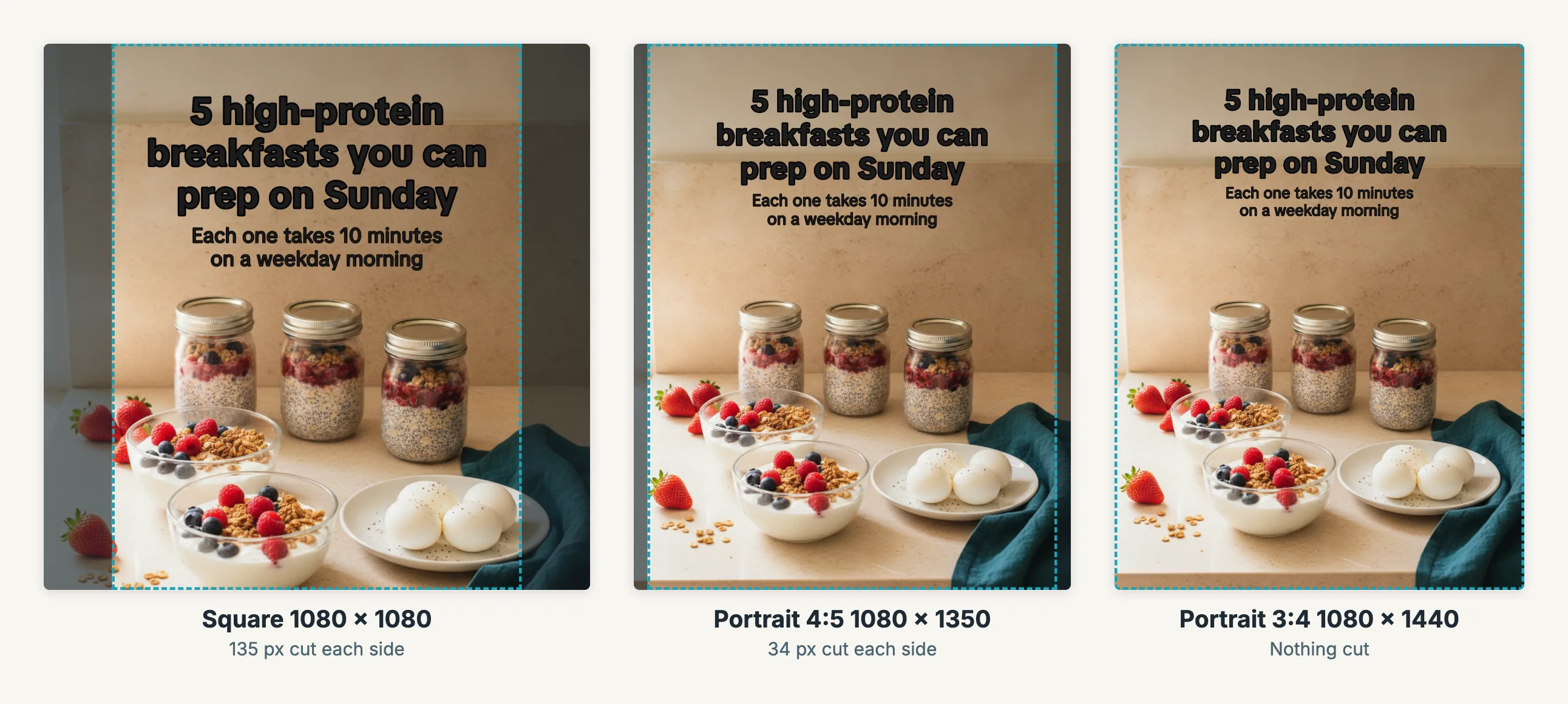
One slide exported from Wavegrain at three sizes. The dashed box is what a 3:4 profile grid thumbnail shows; the shaded sides are cut. The caption stays inside the box on all three because it sits in the centre. The background is a Wavegrain-generated image.
Where to Keep Text on a Carousel Slide
A feed carousel has no app buttons over the image. The caption, likes, and slide dots sit below it. That makes carousels more forgiving than Reels or TikTok, but two areas still matter.
The sides. Keep headlines inside the centre if the first slide will be your grid thumbnail. On a 4:5 slide, leaving at least 60 pixels on each side covers the grid crop with room to spare.
The edges in general. Text that runs close to any edge looks cramped on a phone and can be clipped when someone else shares or reposts the slide. A margin of 60 to 80 pixels around the text is a practical working rule, not a platform requirement.
Faces and the subject. Text across a face hides the part of the image people look at first. Place captions over sky, wall, table, or a soft background area instead.
Vertical formats are different. If you also turn the slides into a Story, Reel, or TikTok, the app overlays buttons, captions, and a profile row on the image. Our TikTok slideshow guide covers where those areas sit on a 1080x1920 frame.
How Many Slides, and What Else Has Limits
Instagram's help center says you can share up to 20 photos and videos as a single post. Instagram raised that limit from 10 in 2024, and the publishing API still documents 10.
More slides is not automatically better. A carousel should be as long as its content, and every slide should earn the next swipe. Our guide to carousel hooks covers how to make the first two slides do that.
You can add a song to a photo carousel, which Meta announced in 2023. Instagram's help center says music cannot be added to a carousel that contains videos.
Exporting a Carousel at the Right Size
Design at the final size from the start. Resizing a finished 1:1 slide to 4:5 means stretching, cropping, or adding bars, and each one shows.
In Wavegrain you pick the output shape for a project: Instagram 4:5 at 1080x1350, Instagram 3:4 at 1080x1440, or square at 1080x1080. Captions are placed for that shape, and the export downloads every slide at the same size as PNG files. The 3:4 option is labelled with a reminder to check that your publishing route supports it.
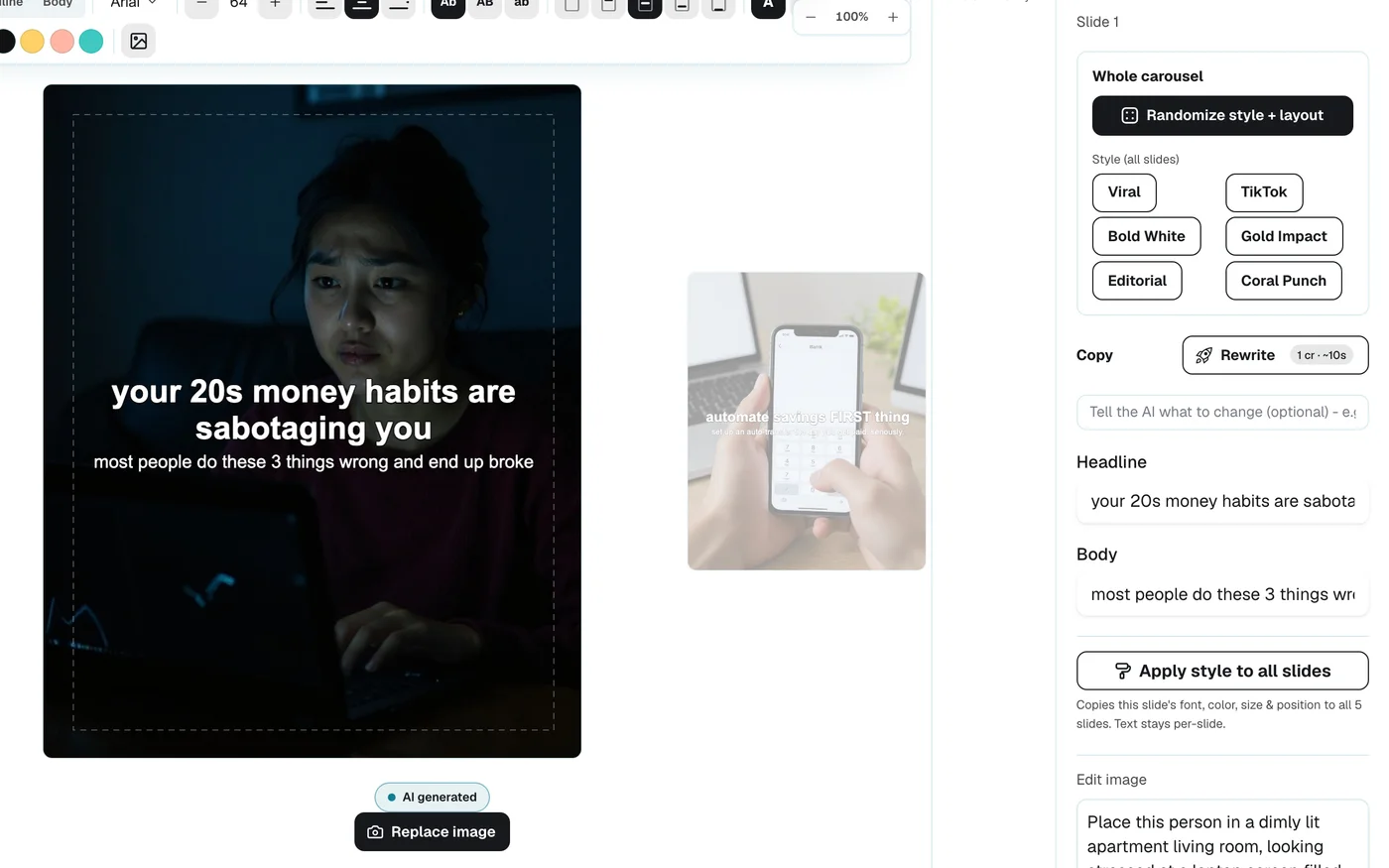
Wavegrain's editor, where you can check each slide's text placement before export. This screenshot shows the product, not a performance result.
For the full sequence from topic to finished carousel, see the AI carousel workflow guide. If you start from a set of photos you already chose, the board to carousel page shows how a collection becomes slides in these sizes.
Frequently asked questions
- What is the best size for an Instagram carousel?
- 1080x1350 pixels (4:5) is the safest choice because the Instagram app and scheduling tools both accept it. 1080x1440 (3:4) gives a taller slide when you post in the app, but tools that publish through Instagram's API may crop it to 4:5.
- Does Instagram support 3:4 carousels?
- Yes, in the app. Instagram's help center describes keeping photo resolution for ratios between 1.91:1 and 3:4, which means 1080 pixels wide and 566 to 1440 pixels tall. Instagram's publishing API still documents a 4:5 limit, so check your scheduler before exporting at 3:4.
- How many slides can an Instagram carousel have?
- Up to 20 photos and videos when posting in the Instagram app. Instagram's content publishing API documents a limit of 10, so some scheduling tools may cap a carousel at 10 items.
- Can each carousel slide have a different size?
- Plan for no. Instagram's developer documentation says carousel images are cropped based on the first image. Export every slide at the same size so nothing is cropped unexpectedly.
- Can I add music to an Instagram photo carousel?
- Yes. Meta added music to photo carousels in 2023. Instagram's help center says music cannot be added to carousels that contain videos.